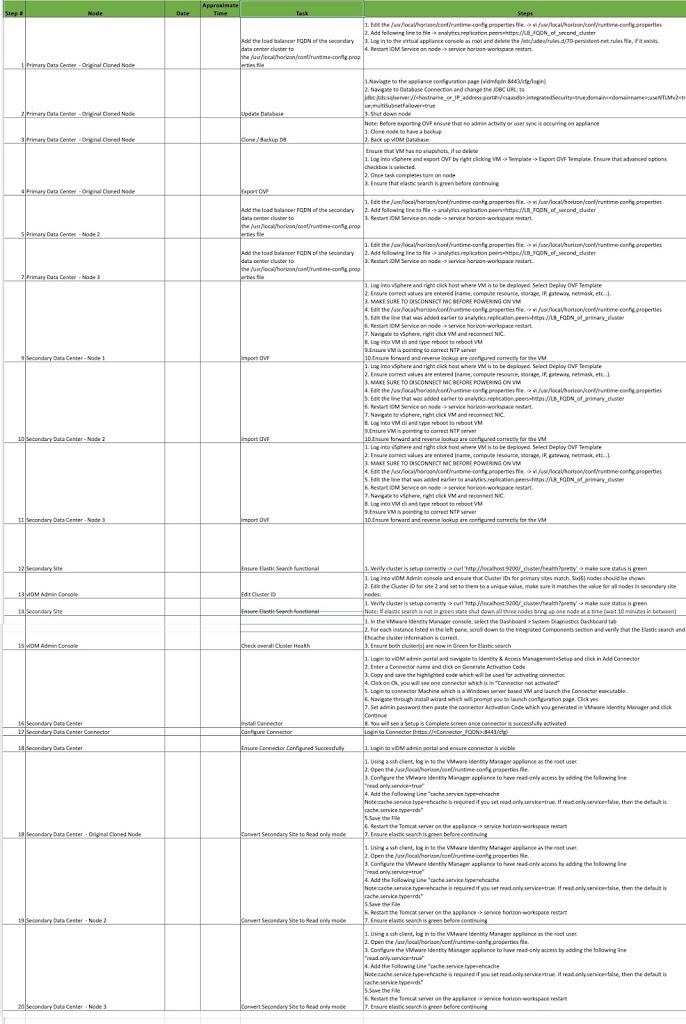
Workspace ONE Access Multisite Tasks – One Pager

For the past few weeks, I have been working with my project team and my customer to help them stand up VMware Access on a secondary site. With the help of Haseeb Waseem, I have created a single spreadsheet which includes all the major steps needed to create a secondary site.

Hope this is helpful to others. Here is the direct link for the spreadsheet.

[table id=1 /]


You might be interested in …

Install and configure VMware PowerCLI version 10

Home, VMware

VMware PowerCLI is a collection of Windows Powershell modules that are used to manage and maintain a VMware virtual environment. VMware PowerCLI contains modules of cmdlets based on Microsoft PowerShell for automating vSphere, VMware Site Recovery Manager,vSphere Automation SDK, vCloud Director, vCloud Air, vSphere Update Manager, vRealize Operations Manager, VMware Horizon, NSX-T, and VMware Cloud on AWS administration. VMware PowerCLI provides a PowerShell interface to the VMware product […]

Read More

Workspace ONE Access Log Files and Location

VMware, Workspace ONE Access

Workspace ONE Access Logs and Config File location I came across many times with my customers asking about the logs file location and config file for VMware Workspace ONE Access. Below table has most useful log file location and config file that Engineers and admin should know about and will be helpful to troubleshoot WS1 […]

Read More

Enabling dynamic codec switching Horizon View 7.10

VMware

VMware Horizon 7.10 – released on September 17, 2019 – ships with a new dynamic encoder. Depending on what content you’re watching in your VDI, it will seamlessly switch to the best suiting codec for optimal performance/quality-balance. While H.264 is ideal for rapidly changing content like videos, JPG/PNG offers better quality for more static content […]

Read More

Leave a Reply

Your email address will not be published. Required fields are marked *